Quantcast
Channel: Active questions tagged react-native+android - Stack Overflow
Viewing all 30345 articles
Browse latest View live

Does SAF (Storage Access Framework) needs any permission for accessing storage?

$
0
0

I'm trying to understand the permission needed when using (SAF) Storage Access Framework to access files (in my case it's Internal storage, files which are not lying on External SD Card). From the documentation, I understand client is suppose to request permission to interact with files.

In the SAF, providers and clients don't interact directly. A client requests permission to interact with files (that is, to read, edit, create, or delete files).

However, I have also been reading a few articles (Link 1)(Link 2) which mentioned as below: (In my own words: Accessing storage without having user granting READ/WRITE permission)

  • get away with READ/WRITE permissions on Android
  • Accessing Storage Volume without Storage Permissions

In my case:

I use react-native-document-picker for choosing a file (operation does not perform any file changes, only READ), when the application on ANDROID deny the storage permission. I'm getting java.io.IOException: Permission denied.

Issue goes away when (storage permission is allowed && Gallery was opened at least once in app). Meaning, if the user allow storage permission and continue opening Files. I will still get java.io.IOException: Permission denied, unless both conditions are met.

Hence I'm confused if (SAF) really do not required READ/WRITE storage permission?


NPM 6.13.4 After the update, npm starts and the js node closes immediately, the server reacts to the native server, what should I do?

$
0
0

After the upgrade, npm starts and closes the node js react native server immediately, what should I do?

here is the console code

$ react-native run-android

info Running jetifier to migrate libraries to AndroidX. You can disable it using "--no-jetifier" flag. Jetifier found 864 file(s) to forward-jetify. Using 6 workers... info Starting JS server... info Installing the app...

Task :app:installDebug 07:44:24 V/ddms: execute: running am get-config 07:44:24 V/ddms: execute 'am get-config' on 'emulator-5554' : EOF hit. Read: -1 07:44:24 V/ddms: execute: returning Installing APK 'app-debug.apk' on 'Nexus_S_API_28(AVD) - 9' for app:debug 07:44:24 D/app-debug.apk: Uploading app-debug.apk onto device 'emulator-5554' 07:44:24 D/Device: Uploading file onto device 'emulator-5554' 07:44:24 D/ddms: Reading file permision of D:\cait\nativeTs\App\test\android\app\build\outputs\apk\debug\app-debug.apk as: rwx------ 07:44:24 V/ddms: execute: running pm install -r -t "/data/local/tmp/app-debug.apk" 07:44:24 V/ddms: execute 'pm install -r -t "/data/local/tmp/app-debug.apk"' on 'emulator-5554' : EOF hit. Read: -1 07:44:24 V/ddms: execute: returning 07:44:24 V/ddms: execute: running rm "/data/local/tmp/app-debug.apk" 07:44:24 V/ddms: execute 'rm "/data/local/tmp/app-debug.apk"' on 'emulator-5554' : EOF hit. Read: -1 07:44:24 V/ddms: execute: returning Installed on 1 device.

Deprecated Gradle features were used in this build, making it incompatible with Gradle 6.0. Use '--warning-mode all' to show the individual deprecation warnings. See https://docs.gradle.org/5.5/userguide/command_line_interface.html#sec:command_line_warnings

BUILD SUCCESSFUL in 53s 27 actionable tasks: 27 executed info Connecting to the development server... info Starting the app on "emulator-5554"... Starting: Intent { cmp=com.test/.MainActivity } Done in 61.77s.

Could not find or load main class -Xmx64m, failed to install the app react-native when running on windows

$
0
0

I have cloned the react native existing project. After i have installed all the dependencies by using npm install command. But when i run react-native run-android i get following error.

Could not find or load main class -Xmx64m, failed to install the app

enter image description here

I have also added Androind variable environments and java V.A correctly. I have also tried to create new project with react-native cli and its working perfectly on my windows machine.

Could not find com.android.tools.build:gradle:3.5

$
0
0

I'm trying to update gradle from 1.3.1 to 3.5, as some of my dependencies requires version 3.3 or above.

I've seen similar questions, but none of them help.

build.gradle:

buildscript {
    repositories {
        jcenter()
    }
    dependencies {
        classpath 'com.android.tools.build:gradle:3.5'
    }
}

gradle-wrapper.properties:

distributionBase=GRADLE_USER_HOME
distributionPath=wrapper/dists
zipStoreBase=GRADLE_USER_HOME
zipStorePath=wrapper/dists
distributionUrl=https\://services.gradle.org/distributions/gradle-3.5-all.zip

Still i'm getting this when trying to do anything (build, clean etc):

Building and installing the app on the device (cd android && ./gradlew installDebug...

FAILURE: Build failed with an exception.

* What went wrong:
A problem occurred configuring root project 'chat'.
> Could not resolve all dependencies for configuration ':classpath'.
   > Could not find com.android.tools.build:gradle:3.5.
     Searched in the following locations:
         https://jcenter.bintray.com/com/android/tools/build/gradle/3.5/gradle-3.5.pom
         https://jcenter.bintray.com/com/android/tools/build/gradle/3.5/gradle-3.5.jar
     Required by:
         project :

* Try:
Run with --stacktrace option to get the stack trace. Run with --info or --debug option to get more log output.

BUILD FAILED

Vocal Assistant app replacing Google Assistant in react native (preferably) or in Java

$
0
0

I'm actually making a vocal assistant, and I would like to make an application for it, that would replace Google Assistant on my phone. In the Android Settings, it's theorically possible to use another app instead of Google Assistant. My question is:

Is there a particular way to code my application so that it could replace Google Assistant ? And is it possible in React Native or must I do it in Java ?

Hide Android Navigation Bar in React Native

$
0
0

How can I hide the Android Navigation Bar in React Native?

I'm referring to the bar at the bottom of the screen that has the software back button and home button, not the component at the top of the page that comes with the Navigator Component.

Android Navigation Bar

This page on android.com explains how to do it for native developers. Can someone explain how to accomplish this via React Native apps? Thanks.

React Native: View Config not found for name RNCWebView

$
0
0

error image

I'm trying to use WebView from react-native-webview so when i press the button (renderItem function) it'll open a webview from the link given by the api, but however i try to use the webview the error from the image appears.

import React, { Component } from 'react';
import api from '../services/api';

import { View, Text, FlatList, TouchableOpacity, StyleSheet } from 'react-native';

export default class Main extends Component {
    static navigationOptions = {
        title: "JSHunt"
    };

    state = {
      productInfo: {},
      docs: [],
      page: 1,
    };

    componentDidMount() {
      this.loadProducts();
    }

    loadProducts = async (page = 1) => {
      const response = await api.get(`/products?page=${page}`);

      const { docs, ...productInfo } = response.data;

      this.setState({ 
        docs: [... this.state.docs, ...docs], 
        productInfo,
        page
      });
    };

    loadMore = () => {
      const { page, productInfo } = this.state;

      if(page === productInfo.pages) return;

      const pageNumber = page + 1;

      this.loadProducts(pageNumber)
    };

    renderItem = ({ item }) => (
      <View style={styles.productContainer}>
        <Text style={styles.productTitle}>{item.title}</Text>
        <Text style={styles.productDescription}>{item.description}</Text>
        <TouchableOpacity style={styles.productButton}
         onPress={() => {
           this.props.navigation.navigate('Product', { product: item })
         }}>
          <Text style={styles.productButtonText}>Acessar</Text>
        </TouchableOpacity>
      </View>
    )

    render() {
        return(
          <View style={styles.container}>
            <FlatList contentContainerStyle={styles.list}
            data={this.state.docs} keyExtractor={item => item._id} renderItem={this.renderItem}
            onEndReached={this.loadMore}
            onEndReachedThreshold={0.1}/>
          </View>
        )
    }
}

WebView component, here i'm using the arrow function instead of the class so i can pass the "navigation" data from the api that's being imported from '../services/api';

import React from 'react';

import { WebView } from 'react-native-webview';

 const Product = ({ navigation }) => (
  <WebView source={{ uri: navigation.state.params.product.url}} />
);

Product.navigationOptions = ({ navigation }) => ({
  title: navigation.state.params.product.title
});

export default Product;

How to dynamically include a module in React Native

$
0
0

I am trying to dynamically do a dynamic import import (this.props.myImportModulePath) but I get :

Error: TrasformError index.js: index.js:Invalid call at line 12: import(_this.props.myImportModulePath), js engine: hermes  

I am not sure that this is the way to go about it, but what I am trying to get is to get import ToastExample from './ToastExample'; dynamically.

Below is how I go about it.

Thank you all in advance.

import React, {Component} from 'react';
import {AppRegistry, Text} from 'react-native';

import {name as appName} from './app.json';

class HelloWorld extends Component {

    constructor(props) {
        super(props);

        this.state = {
            OtherComponent: React.lazy(() => import (this.props.myImportModulePath))
        }
    }

    render() {
        return (
            <Text>HELLO World</Text>
        );
    }
}
AppRegistry.registerComponent(appName, () => HelloWorld);  

Please note that this works when I change

OtherComponent: React.lazy(() => import (this.props.myImportModulePath))

into

OtherComponent: React.lazy(() => import ('./myImportModule')),

that is, passing the path directly as a string './myImportModule' instead of passing it as a prop value this.props.myImportModulePath

Thank you all in advance.


How to get ReactContext in a Android Service?

$
0
0

I want to start my service from ReactNative code. Here is the module I use to bridge.

public class HeartbeatModule extends ReactContextBaseJavaModule {
    public static final String REACT_CLASS = "Heartbeat";
    private static ReactApplicationContext reactContext;

    public HeartbeatModule(@Nonnull ReactApplicationContext reactContext) {
      super(reactContext);
      this.reactContext = reactContext;
    }

    @Nonnull
    @Override
    public String getName() {
      return REACT_CLASS;
    }

    @ReactMethod
     public void startService() {
     // Starting the heartbeat service

     this.reactContext.startService(new Intent(this.reactContext, HeartbeatService.class));
     }


    @ReactMethod
    public void stopService() {
        // Starting the heartbeat service

        this.reactContext.stopService(new Intent(this.reactContext, HeartbeatService.class));
    }
}

My question is how can I access this reactContext in my service. And how to sustain it when the service restarts.

Need ideas of solving problem with app I built

$
0
0

I built this app: https://play.google.com/store/apps/details?id=com.FindNewMusic_Vakil

But ios keeps rejecting me for following reason:

Guideline 4.2.3 - Design - Minimum Functionality


We were required to install Spotify before we could use your app. Apps should be able to run on launch, without requiring additional apps to be installed.

Next Steps

To resolve this issue, please revise your app to ensure that users can use it upon launch. If your app requires authentication before use, please use methods that can authenticate users from within your app.

Even though I added another functionality which enables you to view artist in app (following pics). Any ideas of what I should do to get app to be approved because I am lost at this point

Spotify main screenenter image description here

Issue with Rotating Image while Saving in React Native

$
0
0

Actual Behaviour :

I am supposed to implement signature pad in landscape-right mode along with a timestamp of signature drawn. Then take a screenshot of the view, and save it in document directory (iOS) or external directory (android) in portrait mode by rotating it. I was successful in implementing signature screen in landscape-right mode using tranform: [{rotate: '90deg"}] css property, and react-native-signature-capture, save the captured screenshot of signature along with the timestamp of signature drawn in local directory using react-native-view-shot and convert it into base64 format using react-native-fs. But the saved screenshot is not in portrait mode and i'm trying to rotate the image while saving it in document directory (iOS) or external directory (android) without using any modules. I also tried rotating the image while saving it using canvas context API but could not find way to access canvas in react-native to rotate image while saving it as canvas is HTML DOM related.

Expected Behaviour :

I'm supposed to save the signature drawn along with timestamp in document directory (iOS) or external directory (android) in portrait mode as shown in below screenshot. Can someone help me please. Thanks in advance.

Additional Resources :

Code :

render() {
  return (
    <View
    style={{
      flex: 1,
      flexDirection: 'row',
      overflow: "hidden",
    }}>
    <StatusBar hidden={true} />
    <View
      style={{
        flex: 0.8,
        flexDirection: 'row-reverse',
        marginVertical: width / 18,
        overflow: "hidden",
      }}>
      <ViewShot
        ref="viewShot"
        style={[styles.viewShot, { transform: [{ rotate: this.state.bool && '90deg' }] }]}>
        {/* options={{ width: height, height: width }}> */}
        <SignatureCapture
          style={styles.signature}
          ref={sign => (this.signComponent = sign)}
          onSaveEvent={this._onSaveEvent}
          onDragEvent={this._onDragEvent}
          saveImageFileInExtStorage={true}
          showNativeButtons={false}
          showTitleLabel={false}
          showBorder={false}
          viewMode={'portrait'}
          square={true}
          backgroundColor={"white"}
          maxSize={800}
          rotateClockwise={!!true}
        />
        <View
          ref="timeRef"
          style={{
            width: width / 10,
            height: width / 3,
            justifyContent: 'flex-end',
            flexDirection: 'row-reverse',
          }}>
          <View
            style={{
              width: width / 1.8,
              height: width / 1.8,
              transform: [{ rotate: '-90deg' }],
              overflow: "hidden",
              paddingLeft: width / 18,
              paddingTop: width / 25
            }}>
            <Text style={styles.time}>{this.state.data}</Text>
          </View>
        </View>
      </ViewShot>
      <Image
        ref="imageRef"
        source={{ uri: this.state.imageUri }}
        style={{ transform: [{ rotate: '90deg' }] }}
      />
    </View>
    <View
      style={{
        flex: 0.2,
        alignItems: 'center',
        justifyContent: 'space-around',
        flexDirection: 'column',
        overflow: "hidden",
        backgroundColor: Colors.white,
      }}>
      <View
        style={{
          backgroundColor: Colors.darkGreen,
          width: width / 2,
          justifyContent: 'center',
          alignItems: 'center',
          paddingRight: width / 25,
          paddingVertical: width / 37.5,
          transform: [{ rotate: '-90deg' }],
          overflow: "hidden",
        }}>
        <TouchableOpacity
          hitSlop={{ top: 30, left: 50, right: 50, bottom: 30 }}
          onPress={() => {
            this.saveSign();
          }}>
          <Text style={{ fontSize: width / 18, color: Colors.white }}>Submit </Text>
        </TouchableOpacity>
      </View>
      <View
        style={{
          backgroundColor: '#5476ab',
          width: width / 2,
          justifyContent: 'center',
          alignItems: 'center',
          paddingVertical: width / 37.5,
          transform: [{ rotate: '-90deg' }],
          overflow: "hidden",
        }}>
        <TouchableOpacity
          hitSlop={{ top: 30, left: 50, right: 50, bottom: 30 }}
          onPress={() => {
            this.resetSign();
          }}>
          <Text style={{ fontSize: width / 18, color: Colors.white }}>Clear</Text>
        </TouchableOpacity>
      </View>
      <View
        style={{
          backgroundColor: '#73c5de',
          width: width / 2,
          justifyContent: 'center',
          alignItems: 'center',
          paddingVertical: 10,
          transform: [{ rotate: '-90deg' }],
        }}>
        <TouchableOpacity
          hitSlop={{ top: 30, left: 50, right: 50, bottom: 30 }}
          onPress={() => {
            this.onCancel();
          }}>
          <Text style={{ fontSize: width / 18, color: Colors.white }}>Cancel</Text>
        </TouchableOpacity>
      </View>
    </View>
  </View>

); }

_onSaveEvent(result) {

this.setState({ signature: result.pathName, 
                markResult: result.encoded });

}

_onDragEvent() {

this.setState({ dragged: true });

}

saveSign() {

if (this.state.dragged === true) {
  this.setState({ bool: true });
  this.refs.viewShot.capture().then(uri => {
    this.setState({ imageUri: uri });
    console.log("uri123", uri);
     RNFS.readFile(this.state.imageUri, 
      'base64').then(image => {
      console.log("image123", image);
      this.setState({ sign: image }, () => {
        this.ChangeOrientation();
      });
    });
   });
  } else {
  Alert.alert('NALG', 'Please sign the signature 
  pad to submit');
  }

ChangeOrientation() {

this.props.getSignature(this.state.sign);
this.props.setModalVisible(!this.props.modalVisible);

}

Screenshot of Actual Behaviour :

enter image description here

Screenshot of Expected Behaviour :

enter image description here

Environment:

react-native : 0.61.1

react-native-view-shot : ^3.0.2

react-native-signature-capture : ^0.4.10

react-native-fs : ^2.16.2

React-native keyboard no comma on android Samsung devices in Text Input

$
0
0

I have a React-native app with TextInput and KeyboardAvoidingView. And everywhere it works well except android Samsung devices, especially Samsung A3. Because on this device the keyboard is appearing without a comma, but I need to use it on the screen.

I already tried the steps from this article, removed autoCapitalize="none" from the TextInput component, but it is not working for me.

Can somebody recommend how can I solve it please.[enter image description here

<TextInput
            style={textInput}
            placeholder={props.placeholder}
            underlineColorAndroid='transparent' editable={!props.disabled}
            keyboardType={keyboardType} 
            autoCorrect={false} selection={state.position}
            value={state.value} onChangeText={this._onChangeText}
            onFocus={this._onFocus} onBlur={this._onBlur}
            autoFocus={autoFocus}
          />

React Native Maps: Markers image doesn't show using Custom Marker in react-native-maps

$
0
0

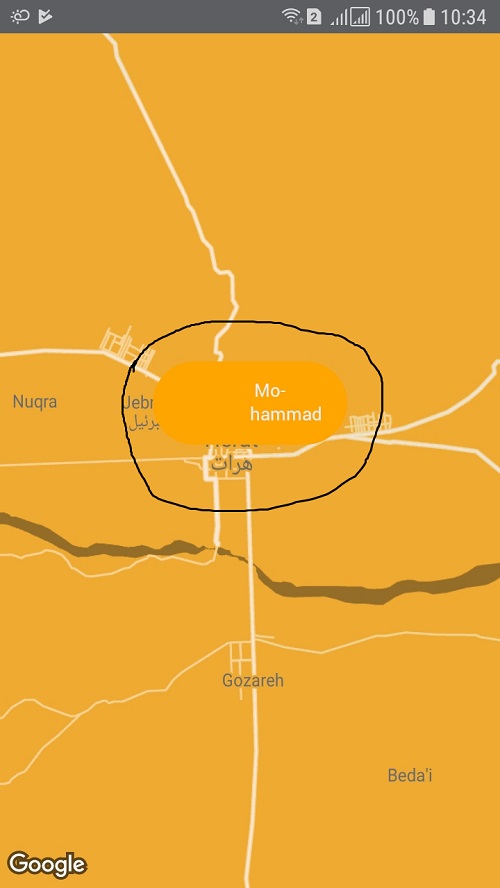
I'm using react-native-maps but I faced a problem that after a lot of googling without answer makes me ask it here. I'm trying to use Custom Marker for the marker in the map as the following picture

enter image description here

  • as I searched I found out that needed to use Custom Marker to accomplish the maker's design, then I created a Custom Marker component

    import React, { Component } from "react";
    import { View } from "react-native";
    import {
    Text,
    Left,
    Right,
    Thumbnail,
    } from "native-base";
    const defaultEmployeeLogo = require("../../../assets/defualtEmployee.png");
    class CustomMarker extends Component {
    render() {
        return (
        <View style={{ flexDirection: 'row', width: 140, height: 60, 
          borderRadius: 70, backgroundColor: 'orange' }}>
            <Left>
                <Thumbnail source={defaultEmployeeLogo} />
            </Left>
            <Right>
                <Text style={{
                    color: '#fef',
                    fontSize: 13,
                    paddingBottom: 2,
                    fontFamily: 'Roboto',
                    alignItems: 'center',
                    paddingRight: 10
                }}>Mohammad</Text>
            </Right></View >);
       }
    }
    export default CustomMarker;
    

when I use CustomMarker.js class solely it works fine and it shows the image but when I use it as the marker custom view it doesn't show the image

enter image description here

I don't know why it can't render the image with Custom Marker in android. and here is my code where I'm using map, markers and custom marker class

return (
  <View style={styles.map_container}>
    <MapView
      style={styles.map}
      customMapStyle={customrMapStyle}
      region={{
        latitude: this.state.region.latitude,
        longitude: this.state.region.longitude,
        latitudeDelta: 0.4,
        longitudeDelta: 0.41,
      }} >
      {
        coordinationData.map(function (marker, i) {

          let lat = marker.latLang.latitude;
          let lang = marker.latLang.longitude;
           <MapView.Marker
            key={i}
            coordinate={
              {
                latitude: lat,
                longitude: lang,
                latitudeDelta: 0.4,
                longitudeDelta: 0.41
              }
            }
            title={marker.title}
            description={marker.description}

          >
            <CustomMarker />
          </MapView.Marker>
        })}
    </MapView>
  </View>

any kind of help would be appreciated.

Couldn't recieve foreground notification with react native firebase (android)

$
0
0

-I'am unable to get foreground notification on android device.

-it works fine on simulator but not on real device.

-background is working but after opening it i receive an alert with value initial notification, I don't now why?

"react": "16.8.6", "react-native": "^0.58.5", "react-native-firebase": "^5.2.3",

  • my AndroidManifest:
<meta-data android:name="com.google.firebase.messaging.default_notification_icon" android:resource="@drawable/ic_notification"/>
    <meta-data android:name="com.google.firebase.messaging.default_notification_channel_id" android:value="test_app"/>

    <service android:name="io.invertase.firebase.messaging.RNFirebaseMessagingService">
      <intent-filter>
        <action android:name="com.google.firebase.MESSAGING_EVENT" />
      </intent-filter>
    </service>

    <service android:name="io.invertase.firebase.messaging.RNFirebaseInstanceIdService">
      <intent-filter>
        <action android:name="com.google.firebase.INSTANCE_ID_EVENT"/>
      </intent-filter>
    </service>

    <receiver android:name="io.invertase.firebase.notifications.RNFirebaseNotificationReceiver"/>
    <receiver android:enabled="true" android:exported="true" android:name="io.invertase.firebase.notifications.RNFirebaseNotificationsRebootReceiver">
      <intent-filter>
        <action android:name="android.intent.action.BOOT_COMPLETED"/>
        <action android:name="android.intent.action.QUICKBOOT_POWERON"/>
        <action android:name="com.htc.intent.action.QUICKBOOT_POWERON"/>
        <category android:name="android.intent.category.DEFAULT" />
      </intent-filter>
    </receiver>
  • my compontentDidMount:
firebase
      .messaging()
      .hasPermission()
      .then(enabled => {
        console.log('HAS PERMISS: ', enabled);
        if (enabled) {
          firebase
            .messaging()
            .getToken()
            .then(token => {
              console.log('LOG: ', token);
            })
            .catch(err => console.log(err));
        } else {
          firebase.messaging().requestPermission();
        }
      });

    this.onMessageListener = firebase.messaging().onMessage((message: RemoteMessage) => {
      console.log('mmmm==', message);
      const notification_to_be_displayed = new firebase.notifications.Notification({
        data: message.data,
        sound: 'default',
        show_in_foreground: true,
        title: message.title,
        body: message.body,
      });
      if (Platform.OS === 'android') {
        notification_to_be_displayed.android
          .setPriority(firebase.notifications.Android.Priority.High)
          .setSound('default')
          .android.setChannelId('test-channel')
          .android.setSmallIcon('@drawable/ic_notification')
          .android.setLargeIcon('@mipmap/ic_launcher')
          .android.setVibrate(1000);
      } else if (Platform.OS === 'ios') {
        notification_to_be_displayed.ios.setBadge(2);
      }
      firebase.notifications().displayNotification(notification_to_be_displayed);
    });

    const notificationOpen1 = await firebase.notifications().getInitialNotification();
    if (notificationOpen1) {
      const action = notificationOpen1.action;
      const notification = notificationOpen1.notification;
      console.log('NOTIFICATION IS OPEN');
    }
    // config android
    const channel = new firebase.notifications.Android.Channel(
      'test-channel',
      'Test Channel',
      firebase.notifications.Android.Importance.Max
    ).setDescription('My apps test channel');

    // Create the channel
    firebase.notifications().android.createChannel(channel);
    this.notificationDisplayedListener = firebase
      .notifications()
      .onNotificationDisplayed((notification: Notification) => {
        console.log('CREATED CHANNEL');
        // Process your notification as required
        // ANDROID: Remote notifications do not contain the channel ID. You will have to specify this manually if you'd like to re-display the notification.
      });

    this.notificationListener = firebase
      .notifications()
      .onNotification((notification: Notification) => {
        console.log('HAS Notification: ', notification);
        // Process your notification as required
        const notification_to_be_displayed = new firebase.notifications.Notification({
          data: notification.data,
          sound: 'default',
          show_in_foreground: true,
          title: notification.title,
          body: notification.body,
        });
        if (Platform.OS === 'android') {
          notification_to_be_displayed.android
            .setPriority(firebase.notifications.Android.Priority.High)
            .setSound('default')
            .android.setChannelId('test-channel')
            .android.setSmallIcon('@drawable/ic_notification')
            .android.setLargeIcon('@mipmap/ic_launcher')
            .android.setVibrate(1000);
        }
        firebase.notifications().displayNotification(notification_to_be_displayed);
      });

    this.notificationOpenedListener = firebase
      .notifications()
      .onNotificationOpened((notificationOpen: NotificationOpen) => {
        // Get the action triggered by the notification being opened
        const action = notificationOpen.action;
        // Get information about the notification that was opened
        const notification = notificationOpen.notification;
        console.log('notification Day nay', notification);
        firebase.notifications().removeDeliveredNotification(notification.notificationId);
      });

please any help...

How do I access USB storage on android device in react-native?

$
0
0

I'm creating an application which to be play on my android device. After several weeks searching and continue to develop the application logic, I still unable to find a way to access USB device.

I'm develop using React-Native CLI and device is running on Nougat 7.1.2.

Application will be run on a device as below:- enter image description here

At application startup, it will check the target selected either local folder or removable drive. If user select removable drive, it should be find any existing removable drive and get all files inside it that having images and video to be play (like screen saver/ slideshow) on main screen.

I've come across USB OTG Storage library, but I'm not understand how to access the USB storage content as the console show any difference log between USB Drive and USB Dongle for Mouse. Metro Server Console

If I'm unmounted and mounted both at several times, both device log will trigger same 'USB DISK 2.0'enter image description here

Is there any other library/packages that able to search for removable drive storage and access it's files?


I need help for create .aar file of react native project to use on other android app

$
0
0

I developed a react native project as fresher and i need to export this project to .aar file for import to android studio project. any one help me for creating .aar file of react native project.

WindowDisablePreview not working in style file

$
0
0

windowDisablePreview not working in React-native/android style.xml file

react native how to disable android dev mode

$
0
0

I've read that disabling the dev mode in Android can help speed up some of the issues with the Android emulator as it keeps not responding at the moment. How do I disable dev mode? I can't find any bool value or anything anywhere in the react native files.

react-native Horizontal FlatList - scrollToEnd() makes whole content to move right side of the view on content changed

$
0
0

I am trying to make a breadcrumb for folder traversal. I built a breadcrumb component by horizontal flatlist, and I was using scrollToEnd() method to scroll to end when new item added into the list. I achieved until this by the following code:

<FlatList
        keyExtractor={(item, index) => item + '' + index}
        contentContainerStyle={{
          backgroundColor
        }}
        style={{}}
        bounces={false}
        data={list.slice()}
        horizontal={true}
        onContentSizeChange={() => {
          (listRef.current as any).scrollToEnd({ animated: true });
        }}
        showsHorizontalScrollIndicator={false}
        renderItem={renderBreadCrumb}
        ItemSeparatorComponent={renderItemSeparator}
        ref={listRef}
      />

But I got stuck into another problem. When I am clicking the breadcrumb item decreasingly, it moves the list towards the right of the view. It occurs in Android only, iOS works fine.

I tried, scrollToOffset() for making the list in the correct position. but it doesn't work.

TouchableOpacity onPress is not working inside CallOut in react-native-map

$
0
0

I am using react-native-map and want to make different buttons inside callout view but onPress is not working inside it. I am using a callout inside the marker. If any has a workaround to solve this please let me know.

Here is my code:

export default class MapTest extends Component {
      constructor(props) {
        super(props);
        this.state = {
      }

      render() {
        return (
          <View style={{ flex: 1 }}>
            <MapView
              style={styles.map}
              region={{
                latitude: this.state.lat,
                longitude: this.state.long,
                latitudeDelta: 0.0922,
                longitudeDelta: 0.0421,
              }}
              showsUserLocation={true}
            >
              <Marker
                ref={ref => { this.mark = ref; }}
                coordinate={{
                  latitude: this.state.lat,
                  longitude: this.state.long
                }}
                title={this.state.formatted_address}
                description='View Details'>
                <Callout>
                <View style={{marginTop: 15, flex: 1}}>
                   <Text style={{fontWeight: "bold"}}>{this.state.Title}</Text>
                    </View>
                    <TouchableOpacity style={{marginTop: 15, flex: 1}} onPress={() => {console.log('this is not working!')}}>
                   <Text style={{fontWeight: "bold"}}>Details</Text>
                    </TouchableOpacity>
                </Callout>
              </Marker>
            </MapView>
          </View>
        );
      }
    }
Viewing all 30345 articles
Browse latest View live


<script src="https://jsc.adskeeper.com/r/s/rssing.com.1596347.js" async> </script>